Style Guides and Examples
Control how the AI writes report comments by creating style guides with tone preferences and providing example comments for it to learn from.
What Are Style Guides?
Style guides control how comments are written. They define:
- Tone – Formal, warm, encouraging
- Structure – Paragraph length, sentence complexity
- Language – Words to use or avoid
- Format – How to begin and end comments
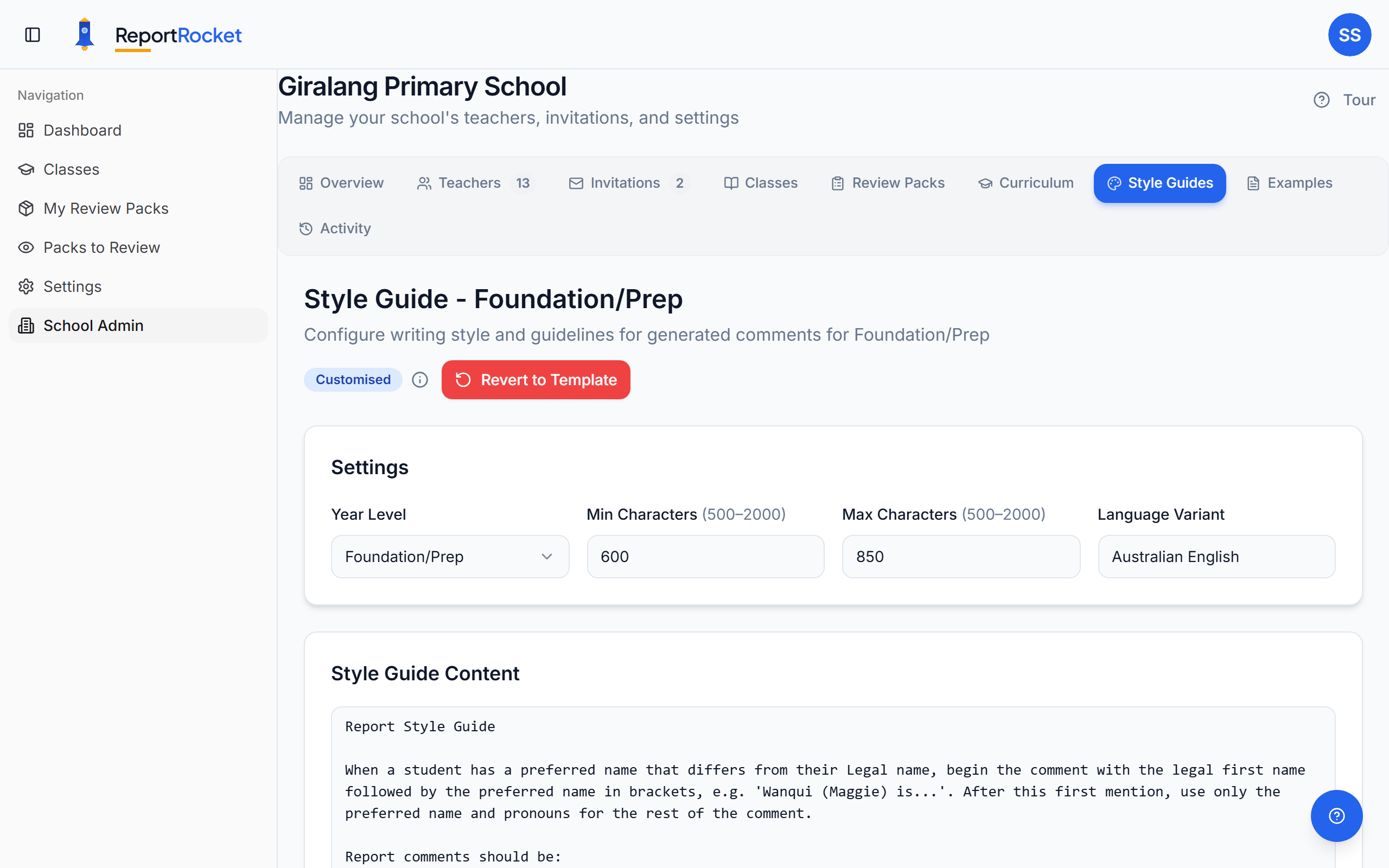
Accessing Style Guides
Go to School Admin > Style Guides and select your year level.
Style Guide Settings
Each style guide has a Settings panel with these controls:
| Setting | Description |
|---|---|
| Min Characters | Minimum comment length (500–2,000 characters) |
| Max Characters | Maximum comment length (500–2,000 characters) |
| Language Variant | The English variant for generated comments (e.g. "Australian English") |
These settings ensure consistent comment length and spelling conventions across your school.
Writing Effective Style Guides
Be Specific
❌ "Write nicely"
✅ "Use encouraging language. Avoid negative phrasing. Start each comment with the student's name."
Include Examples
❌ "Make it sound professional"
✅ "Use phrases like 'has demonstrated', 'consistently shows', 'is developing'. Avoid 'needs to work on' – instead use 'is building skills in'."
Set Boundaries
- Maximum/minimum sentence length
- Paragraph structure preferences
- Required elements (e.g., always mention next steps)
Example Comments
The Examples section lets you provide sample comments the system learns from.
Adding Examples
- Go to School Admin > Examples
- Click "Add Example"
- Paste a high-quality report comment
- Select the year level
- Save
What Makes a Good Example?
- Written by an experienced teacher
- Follows your school's style
- Demonstrates the tone you want
- Includes curriculum-appropriate language
How Many Examples?
3-5 quality examples per year level is ideal. More examples give the AI more patterns to learn from.
How Style Guides Affect Generation
When you generate a comment:
- AI reads your style guide
- AI references your examples
- AI generates content matching your preferences
- Result feels consistent with your school's voice
Tips for Best Results
- Review generated comments – Refine style guide based on what you see
- Update seasonally – Adjust language for different reporting periods
- Share with colleagues – Ensure consistency across year levels
- Test changes – Generate sample comments after updating
Reverting to Defaults
If your customisations aren't working well, click Revert to Template to restore the original style guide and start fresh.
Next Steps
Was this article helpful?